Creative maps
Wplace: make pixel art on a shared world map
A real-world location becomes a meeting point for pixel art. Explore the shared canvas, plan a manageable design and understand why collaboration, access and changing artwork matter before you paint.
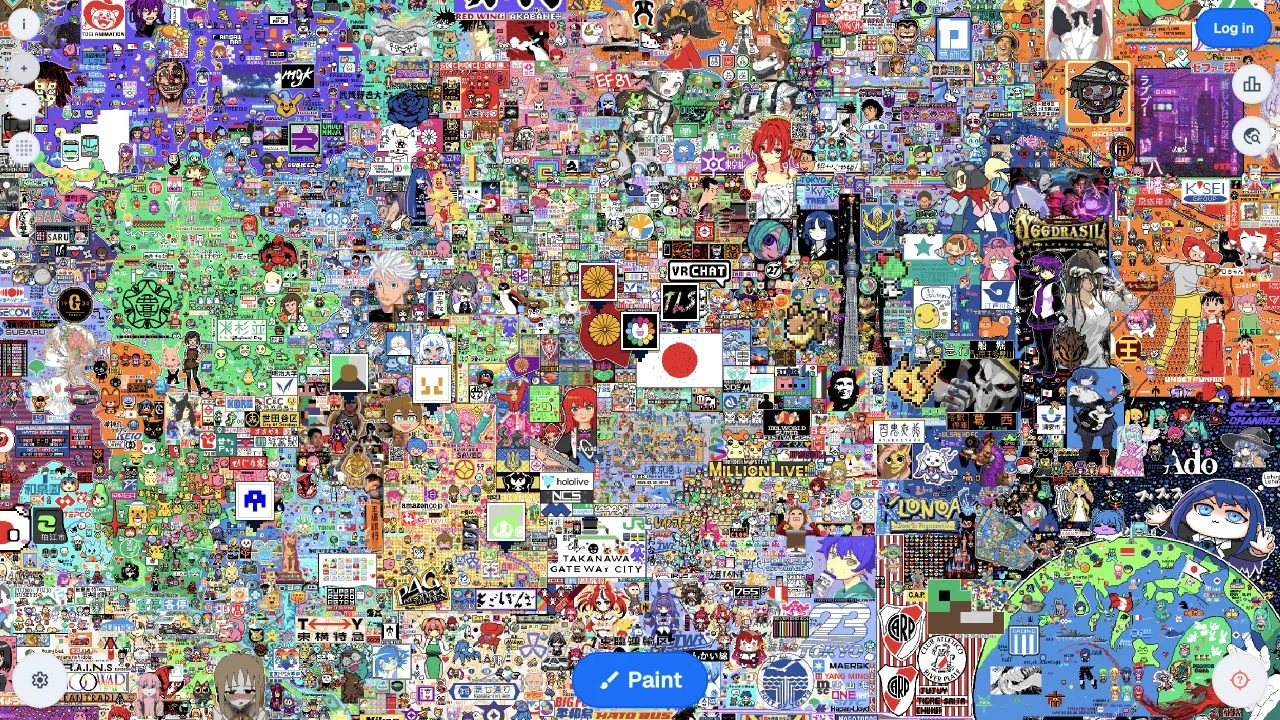
Why play Wplace?
Wplace is a creative map experience rather than a guessing game. You browse a real-world map and add pixels to a shared layer, so a location becomes a meeting point for drawings, local symbols and community projects.
A painting session involves both design and coordination. Other people can work in the same area, and the canvas changes over time. Explore first, then decide whether to make a small independent drawing or join a project with an established community.
How does Wplace work?
A place on Wplace has two layers: the geographic map beneath it and a pixel canvas that people continually change. There is no hidden country to solve or final quiz score to chase. The challenge is making a recognizable design with shared space and the current painting limits. Your drawing can become part of a larger project, but sharing a location also means other contributors can change what appears there.
How do you play Wplace?
- Explore the shared map and find an area whose existing artwork you understand.
- Sign in through the official site if you want to contribute, then choose a color and pixel location.
- Work within the current painting limits and respect the site’s community rules.
How can you improve at Wplace?
Inspect the neighborhood before painting
Zoom out to understand nearby artwork and then inspect your chosen area. A patch that looks empty at one scale may be part of a coordinated design.
Plan a small, readable design
Start with a simple outline and a limited palette. A compact symbol is easier to finish and coordinate than a detailed image whose meaning depends on many pixels.
Coordinate around shared expectations
When joining an existing project, learn its color plan and boundaries before adding pixels. Agreement about the intended image matters as much as individual painting speed.
Is Wplace right for you?
A good fit if…
You enjoy collaborative art, local symbols and watching a shared map evolve. It is a social creative activity for people who would rather contribute to a place than answer questions about it.
Consider another option if…
You need private, permanent artwork or a controlled classroom quiz. The canvas is shared and live; unfamiliar user-created material and changes by other people are part of the experience.
Which games are similar to Wplace?
Choose a different game based on the experience you want.
Geotrivia
Choose Geotrivia’s GeoPaint activity if flag colors interest you but you want a defined daily puzzle. It has a right-answer task rather than a continuously changing shared canvas.
Virtual Vacation
Choose Virtual Vacation when you want to explore places without contributing to a shared project. Its travel footage offers a slower, observational way to spend time with a map.
What should you know before playing Wplace?
Is Wplace a geography quiz?
No. The world map is a setting for collaborative pixel art. Geographic knowledge can help you choose a location, but the main activity is creating and coordinating artwork.
Will my drawing stay unchanged?
A shared canvas does not guarantee permanence. Other contributors can work in the same area, so treat your drawing as a contribution to an evolving project.